“About” Link – Located at the bottom of the Google patents homepage, Links to the Google Patents overview page describing search rules.

Abstract Search – Searches the abstract of documents using the characters “AB=”. (Did not seem to be working properly at the time of writing)

ADJ/x Operator – Search operator that favors results with terms that are within x words of one another and in the order specified.

“Advanced Search” Link – Link in the Google Patents footers to a blank version of the Google patents ‘Results View.’

Learn about Google Patents Advanced Search.
AJD Operator – Search operator that favors results with terms that are within 10 words of one another and in the order specified. (10 is presumed based on USPTO practice)

AJDx Operator – Search operator that favors results with terms that are within x words of one another and in the order specified. (was not working at the time of writing (See ‘ADJ/x Operator’))

AND Operator – Requires search results containing both terms or phrases that were ANDed together.
Application Events – A summary of events related to the application found in the ‘Document Data Box’ in the Google Patents ‘Document View.’

Applications Claiming Priority Section -A section within ‘Priority and Related Applications’ indicating the full list of later patent applications with a priority claim to the patent application being viewed.

“Around The World” Link – Link to jurisdiction by jurisdiction patent coverage for the Google Patents database found on the Google Patents homepage.

Assignee Limit Links Links within the ‘Assignees Tab’ of the ‘Highlight Box’ that further limit the present search string to the listed Assignees. (Owners)

Assignee Search Box Search box in the ‘Search Sidebar’ used to limit search results by an assignee (owner) name.

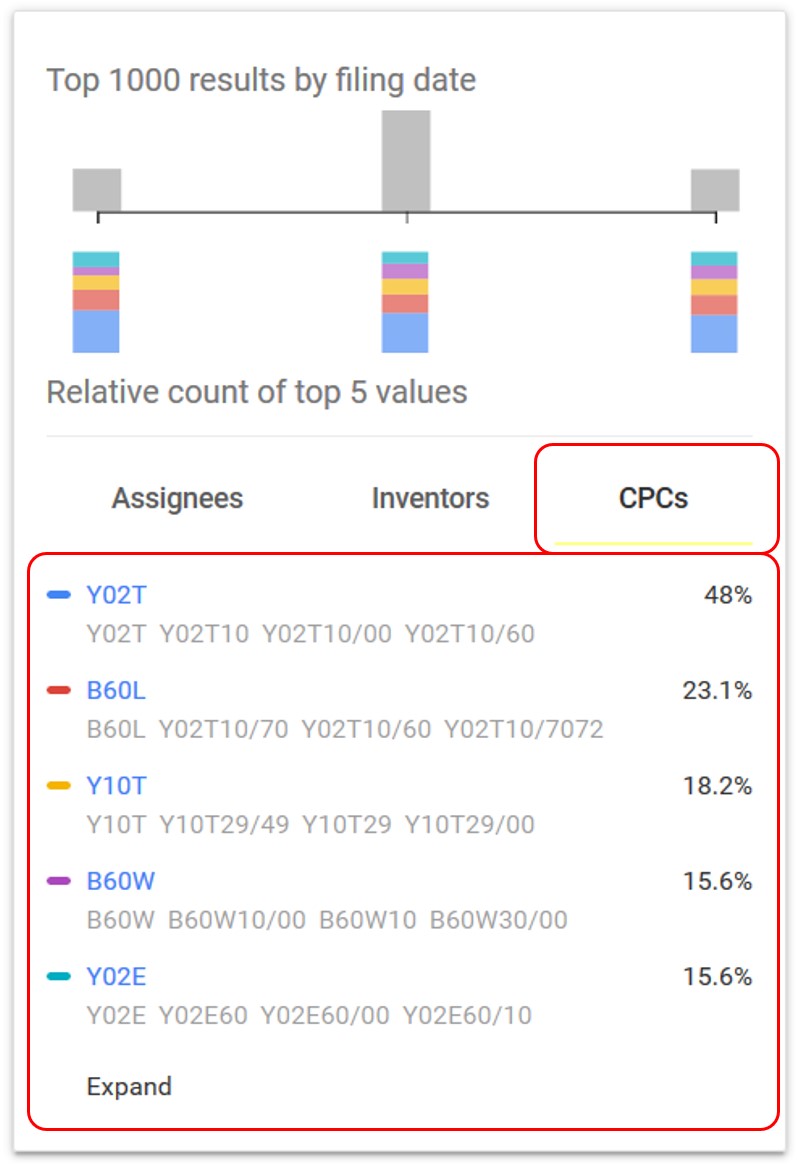
Assignee Tab – A tab within the ‘Highlight Box’ showing the most frequently occurring assignees for a particular Google Patents search result.

Automatic Highlight – Highlights within the ‘Document View’ that Google Patents automatically adds based on the contents of the ‘Search String.’

Back to Results – A link that returns to the ‘Results View’ located in the header of the ‘Document View’ or in the footer of the ‘Search Sidebar.’

or

This Google Patents Glossary is brought to you by John Edel, a Baton Rouge, La patent attorney.
Chemistry Searching – See the Google Patents support documentation: https://support.google.com/faqs/answer/7049475?hl=en&ref_topic=6390989
Child Application – An application that made a direct priority claim to the document being viewed.
Child Application Section – A section within ‘Priority and Related Applications’ indicating the ‘Child Applications’ for the present document.

Cited by – A list of patent documents that cited the document being viewed during the examination of those other patent applications. Viewable in the lower portions of the ‘Document View.’

Claim Count – The count of the total number of claims in the document found in the ‘Claims Section’ of the ‘Document View.’

Claim Search – Searches the claims of documents using the characters “CL=”.

Claim Term Highlights – A search and highlight feature available by clicking or highlighting a term or phrase in the ‘Claims Section’ of the ‘Results View.’

Claims – Claims define the extent of the exclusive right of a patent or being sought in a patent application.
Claims Section – A section often on the lower right hand side of the document view (Scrolling may be necessary) containing the ‘Claims.’

Classifications – The groupings of related technologies into which various patent offices segregate patents and patent applications.
Concepts – A listing of terms and phrases that were extracted from the relevant document found in the lower portions of the ‘Document View.’

Concepts Filter – A filtering option to narrow the list of concepts found in the document.

CPC Limit Links – Links within the ‘CPCs Tab’ of the ‘Highlight Box’ that further limit the present search string to the listed CPC. (patent ‘Classifications’)

CPCs Tab – A tab within the ‘Highlight Box’ showing the most frequently occurring CPCs (patent ‘Classifications’) for a particular search result.
Current Assignee – A listing of Google Patents best record of the ownership of the patent found in the ‘Document Data Box’ in the ‘Document View.’

Date Search Box – Search box in the ‘Search Sidebar’ used to date limit search results by ‘Filing Date, ‘Priority Date’ or ‘Publication Date.’

Date Type Selector – Dropbox in the ‘Search Sidebar’ that selects the type of event that will be searched in a date limited search. The options are a ‘Priority Date Search’, a ‘Filing Date Search’ and a ‘Publication Date Search.’

Deduplicate by – Option in the ‘Results Header’ allowing the duplicate results to be removed either by ‘Patent Family’ or by publication.

Discuss Link – A link near the bottom of the ‘Document Data Box’ in the ‘Document View’ that goes to an external public forum discussion for the relevant document.

Document Data Box – The large box with a blue header containing a variety of Applicant Data found in the ‘Document View.’

Document Data Box Arrow – Quick link to return to the ‘Document Data Box’ from various points lower in the ‘Document View’

Document Link – The link at the top of the ‘Individual Result’ on the ‘Results View’ which is typically the title of the document. The ‘Document Link’ links to the ‘Document View’ for the relevant document.

Document Navigation Buttons – The left and right arrow button to the right of the ‘Search Bar’ in ‘Document View’ that switch between documents. (The keyboard left arrow and right arrow buttons do this as well)

Document Number – The official document identifier for the underlying document displayed in the ‘Document Data Box’ in the ‘Document View.’

Document Snippit – The text excerpt from the original document displayed as part of the ‘Individual Result’ in the Google Patents ‘Results View.’

Document View – The Google Patents view focused on an individual document.

Download PDF – The link in the ‘Document Data Box’ in the ‘Document View’ allowing the download of the underlying document in PDF form.

Download Results – Option in the ‘Results Header’ allowing the search results to be downloaded into CSV format.

Drawing View – A view focused on the patent drawings

EPO – The European Patent Office
Espacenet Link – A link near the bottom of the ‘Document Data Box’ in the ‘Document View’ that goes to the ‘EPO’ record for the relevant document.

Exact Phrase Search – Searches within quotations return results containing the exact phrase.

External Links Section – A section at the bottom of the ‘Document Data Box’ in the ‘Document View’ that has links to relevant databases that Google Patents gets data from
Filing Date – The actual date a patent application was filed.
Filing Date Search – An option in the ‘Date Search Box’ of the ‘Search Sidebar’ that limits results to patent documents having a patent application ‘Filing Date’ inside of the selected date range.

Find Prior Art – Link in the ‘Document Data Box’ in the ‘Document View’ that initiates a search for similar content with a ‘Priority Date’ earlier than the ‘Priority Date’ of the document from which the search originated.

Footer Menu, Main Page -Six links at the bottom of the Google patents main page.

Freeform Text Searching – Search without any Boolean Operators by entering a term or phrase.
Full Window View – A Google Patents view where the results, documents, or drawings utilize the full browser window. (i.e. not ‘Side-By-Side View’)

Global Dossier Link – A link near the bottom of the ‘Document Data Box’ in the ‘Document View’ that executes a search in the USPTO global dossier database to find members of the ‘Patent Family.’

Graduation Cap Icon – the Graduation Cap Icon appearing on the Google Patents ‘Homepage Search Bar’ which toggles the non-patent literature database on and off.

Group by – Option in the ‘Results Header’ allowing the results to be grouped by classification.

Hide Dependent – Link for hiding dependent claims.

Highlight Box – A box to the left of or below the search results in the ‘Results View’ showing filing frequencies and breakdowns of the most prominent ‘Assignees,’ ‘Inventors,’ and ‘Classifications.’

Individual Result – The summary result in a search representing a single document.

Info Section – A collection of links to other sections of the ‘Document View’ found in the ‘Document Data Box’ of the ‘Document View.’

Inventor Limit Links Links within the ‘Inventors Tab’ of the ‘Highlight Box’ that further limit the present search string to the listed Inventors.

Inventor Links – Links in the ‘Inventor List’ of the ‘Document Data Box’ in the ‘Document View’ that performs a separate search to find documents with the same inventor

Inventor List – Listing of inventors in the ‘Document Data Box’ in the ‘Document View.’

Inventors Tab – A tab within the ‘Highlight Box’ showing the most frequently occurring inventors for a particular search result.

Inventor Search Box – Search box in the ‘Search Sidebar’ used to limit search results by an inventor name.

Language Selection Box – Search box within the ‘Other Restrictions Search Box’ of the ‘Search Sidebar’ used to limit the searches to only documents published in certain languages

Litigation Selection Box – Search box within the ‘Other Restrictions Search Box’ of the ‘Search Sidebar’ used to limit the searches to only documents with known related litigation or without known related litigation.

Legal Events – A listing of major patent events such as grant, assignment, and fee payments viewable in the lower portions of the ‘Document View.’

Light bulb Icon – the light bulb icon appearing on the Google Patents ‘Homepage Search Bar’ which toggles the patent database on and off.

Metadata Restrictions – limit searches based on certain document data fields:


Minus Sign – By including the minus sign in a search a term can be removed from the search

NEAR Operator – Search operator that favors results with terms that are within 10 words of one another. (10 is presumed based on USPTO practice)

NEAR/x Operator – Search operator that favors results with terms that are within x words of one another.

NEARx Operator – Search operator that favors results with terms that are within x words of one another.

Non-Patent Citations – A list of non-patent documents cited in the examination of the relevant application viewable in the ‘Document View.’

OR Operator – Requires search results to contain one or the other of the terms or phrases that were ORed together
Other Restrictions Search Box – Search box in the ‘Search Sidebar’ used to limit search results by Patent Office, Language, Status, Type, and Litigation.

Original Document Link – The link having the document number as the text of the link which links to the official publication. Found in the ‘Individual Result’ in the ‘Results View’ of Google Patents.

Patent Family – A group of patent applications with a common inventor and common subject matter.
Patent Office Selection Box – Search box within the ‘Other Restrictions Search Box’ of the ‘Search Sidebar’ used to limit the searches to one or more Patent Offices.

Publication – A document that may be a granted patent or a patent application publication.
Parent Application – An application to which the current document’s patent application made a direct priority claim.
Parent Applications Section – A section within ‘Priority and Related Applications’ indicating the ‘Parent Applications’ for the present document.

Patent Application Number Searches – Patent application number searches can be done by entering the patent application number:

Patent Citations – A list of patent documents cited in the examination of the relevant application viewable in the ‘Document View.’

Patent Number Search – Patent number searches can be done by entering the Patent Document Number:

Patent Publication Search – Patent publication searches (Pre-Grant Publications) can be done by entering the Patent Document Number:

Pencil Icon – Pencil icon near the top of the ‘Results View’ which reveals the ‘Search Sidebar.’ The pencil icon is present only when the ‘Search Sidebar’ is hidden.

Priority and Related Applications– A section in the lower portions of the ‘Document View’ containing subsections including ‘Parent Applications,’ ‘Child Applications,’ and Priority Applications’
Priority Application – An application to which the current document’s patent application made a priority claim.
Priority Application Section – A section within ‘Priority and Related Applications’ indicating the ‘Priority Applications’ for the present document.

Priority Claim – A claim in a patent application seeking credit for an earlier filing date associated with another application.
Priority Date – The date a patent application was filed or the date an earlier patent application was filed in cases where the patent applicant claims benefits from that earlier application.
Priority Date Search – A search that limits results to patent documents having a priority date inside of the selected date range.
Proximity Operators – Operators including NEAR, NEARx, NEAR/x, NEAR/xw, WITH, SAME, AJD, AJDx, ADJ/x, and +xw boost certain results higher in the search results but do not exclude based on proximity.
Publication Date – The date a patent application was published for public view by a Patent Office. Often 18 months after the filing date.
Publication Date Search – A search that limits results to patent documents having a ‘Publication Date’ inside of the selected date range.
Privacy Policy Link – Link in the Google Patents footers to the Google privacy policy.

Public Datasets Link – Link in the Google Patents footers to the Google cloud platform page describing datasets used in Google Patents.

Quotation (“”) search – see ‘Exact Phrase Search’
Result Count – The count or estimation of the number of results within the ‘Results Header’ in the ‘Results View.’

Results Header – The header on the ‘Results Page’ providing several options for sorting and viewing results.

Results / Page – Option in the ‘Results Header’ allowing the display of different numbers of results per page.

Results View – The page where Google Patents search results are displayed.

Results View Footer – A footer in the ‘Results View’ for navigating the search results.

SAME Operator – Search operator that favors results with terms that are within 200 words of one another.

Search Bar – The search bar on the Google Patents home page and on the top of the ‘Results View.’

Search Sidebar – The left-hand sidebar in the ‘Results View’ used to refine search results.

Search Terms Question Mark – the circled question mark icon at the top of the ‘Search Sidebar’ that creates a pop-up scroll describing basic rules Google Patents uses to interpret ‘Search Strings.’

Search String – The sequence of characters appearing in the ‘Search Bar’ that determines the scope of the search.

Search Terms “X” Icon – The “X” icon in the ‘Search Sidebar’ on the
‘Search Results Page’ that closes the ‘Search Sidebar.’

“Send Feedback” Link – Link in the Google Patents footers to report errors and suggestions to the Google Patents team.

Side-By-Side View – A two panel viewing option which may be selected from the ‘Results Header’ when in ‘Full Window View.’ There are three types of ‘Side-By-Side View’ (Results-Document, Results-Drawings, and Document-Drawings)

Side-By-Side View, Results-Document –A two panel viewing option which may be selected from the ‘Results Header.’

Side-By-Side View, Results-Drawings –

Side-By-Side View, Document-Drawings – A ‘Side-By-Side View’ with the document details on the left and the ‘Drawing View’ on the left.

Similar – Link in the ‘Document Data Box’ in the ‘Document View’ that initiates a separate search for documents similar to the present document.

Similar Documents – A listing of documents Google Patents has evaluated as similar found in the lower portions of the ‘Document View.’

Sort By – Option in the ‘Results Header’ allowing the results to be sorted by relevance or age.

Status Selection Box – Search box within the ‘Other Restrictions Search Box’ of the ‘Search Sidebar’ used to limit the searches to only granted patents or only application publications.

Suggestion Icon – Icon which appears in certain search fields to provide suggestions when clicked.

Synonym Box – The box in the ‘Search Sidebar’ where synonyms can be grouped in a search query.

“Terms” Link – Link in the Google patents footers that accesses the Google terms of service.

Type Selection Box – Search box within the ‘Other Restrictions Search Box’ of the ‘Search Sidebar’ used to limit the searches to only granted patents (meaning utility patents) or granted design patents.

Title – The title of the document as typically seen at the top of the content in the ‘Document View’ and as the top of each result in the ‘Results View.’
Title Search – Searches the title field of documents using the characters “TI=”.

USPTO – The United States Patent and Trademark Office
USPTO Assignment Link – A link near the bottom of the ‘Document Data Box’ in the ‘Document View’ that executes an assignment search in the USPTO assignment database

USPTO Link – A link near the bottom of the ‘Document Data Box’ in the ‘Document View’ that goes to the USPTO full text record for the relevant document.

Wildcards – Characters that can represent other characters within a word. The wildcards are ?, *, $, $x, and #.
Worldwide Applications – A listing of related applications in various jurisdictions in the ‘Document Data Box’ in the ‘Document View.’ Hover for application details. Click to see document details.

WITH Operator – Search operator that favors results with terms that are within 20 words of one another. (was not working properly at time of writing)

# Wildcard – Wildcard used to replace exactly one character.

$ Wildcard – Wildcard used to replace any number of characters including zero characters.

$x Wildcard – Wildcard used to replace between zero and x characters.

* Wildcard – Wildcard used to replace any number of characters including zero characters.

? Wildcard – Wildcard used to replace either zero or one character

+xw Operator – Search operator that favors results with terms that are within x words of one another and in the order specified.

/xw Operator – Search operator that favors results with terms that are within x words of one another.
